


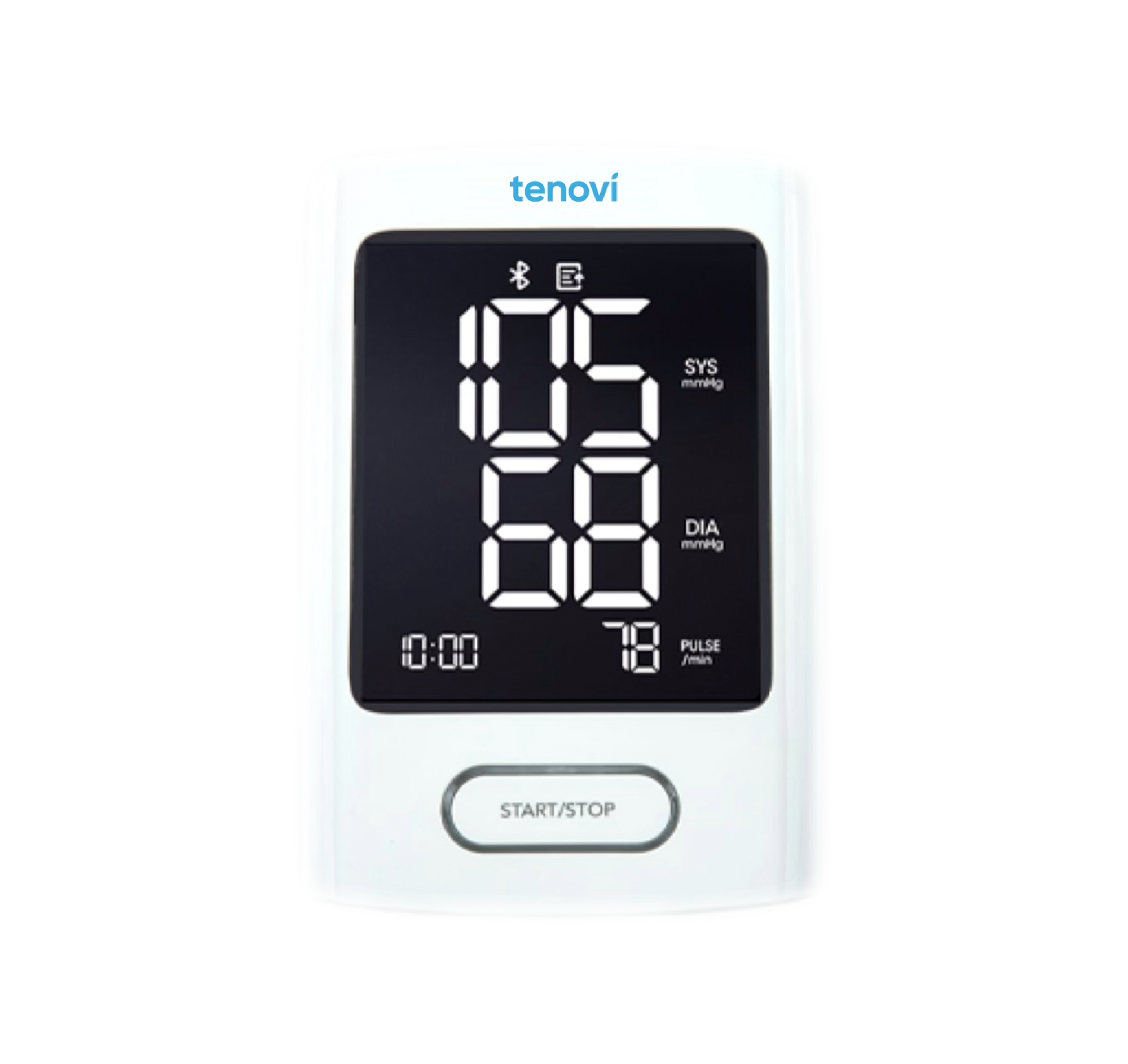
Tenovi Cellular Blood Pressure Monitor
Need help with your Tenovi Cellular Blood Pressure Monitor (BPM)? Find everything you need to know from set up to measurement best practices and troubleshooting. We’ve got you covered.
Jump To SectionHow It Works

Top Tips for Successful Measurement
BPM Power
Do not turn off the monitor after the measurement is displayed. After the device has transmitted your measurement, the device will turn off on it’s own. If you would like to take another measurement, wait for the screen to turn off, then click the Start/Stop button.
This device is only powered by AA batteries. Please do NOT insert any power adapter into the DC port on the right side of the device.

Cuff Size
Ensure the cuff size is appropriate for the patient.

Cuff Hose
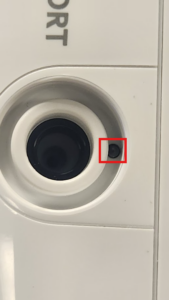
Ensure the cuff connector/hose end-piece is inserted firmly into the monitor all the way. In the cuff connector port, there is a small recessed button that will be pressed when the cuff connector is fully inserted. If this is not pressed in by the cuff connector, then you may receive an error and will not be able to take a measurement until the connector is inserted correctly.
Do NOT pull or pick up the device by the cuff hose. This may cause the connector to be pulled out even if it looks like it is still connected.

Setup & Use Steps
Pull Battery Tab
BPMs arrive with batteries pre-installed, but there is a plastic guard in the battery door that will need to be removed. Simply pull the tab and the batteries will provide power.

Set Up
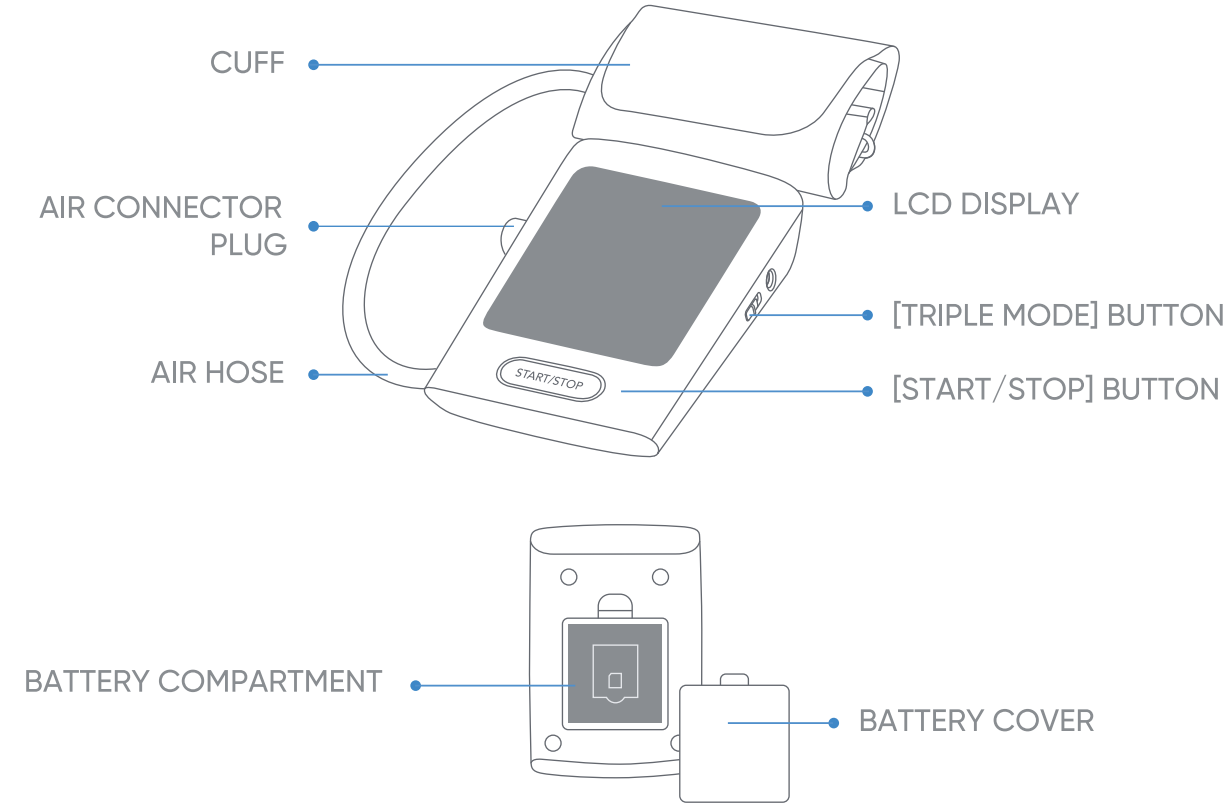
Make sure that the switch labeled “Triple Mode” on the right side of the device is set to 1.

Connect Cuff
Ensure you push the cuff connector all the way in until it’s fully seated in the slot. If not properly connect, the device may display an error

Body Position
Sit comfortably with your left arm resting on the table in front of you and your palm facing up.
Keep your feet perpendicular to the floor and do not cross your legs.
Sit quietly and take 5-6 deep breaths.

Fasten The Cuff
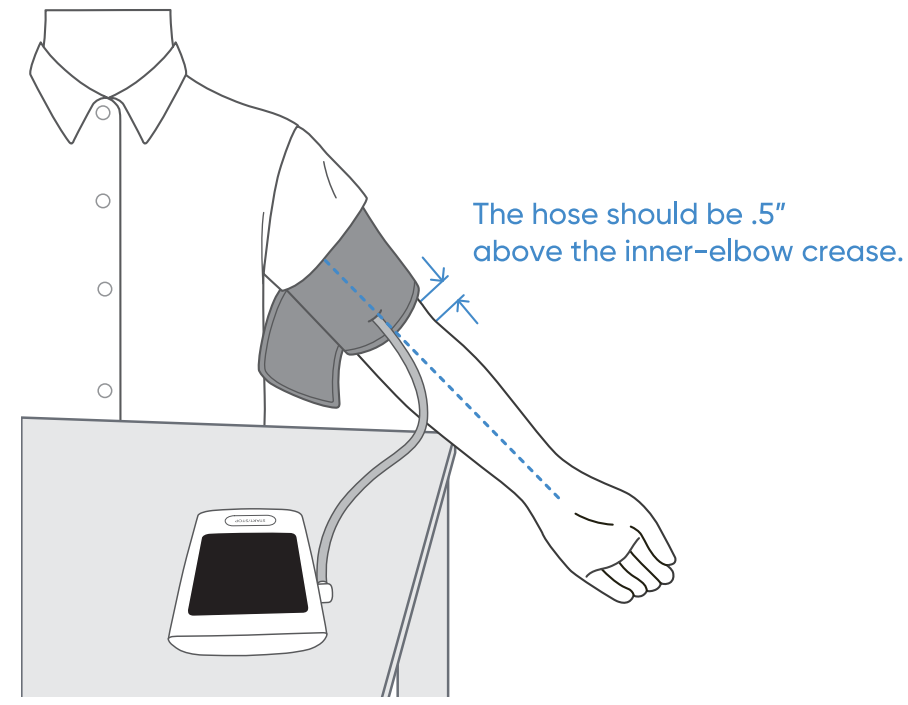
Fasten the cuff to your left upper arm directly on your skin.
Leave 0.5 inches between the cuff and your elbow joint. The hose should rest over your forearm.
Tighten the cuff enough to be able to fit just one finger between the cuff and your arm.
Push Start Button
Press the “Start/Stop” button to inflate.
Keep your body still and do not talk.
Wait until the final reading is displayed on the screen. If there is network connectivity, the signal bars will appear.

Successful Measurement
The device will display “OK” within 2 minutes if the measurement has been successfully transmitted. If not, your measurement will be stored and the device will try again following the next reading.

When Taking a Measurement
Before You Measure
Blood pressure naturally goes up and down throughout the day. Changes of up to 20 mmHg are completely normal. Things like stress, caffeine, movement, talking, and even a full bladder can cause a higher reading. That’s why it’s important to follow a few simple steps to get the most accurate results.
- Sit upright in a chair with your back supported
- Keep your feet flat and legs uncrossed.
- Rest your arm on a flat surface at heart level.
- Put the cuff on bare skin, tube facing down, and not over clothing.
- Stay silent and still. Avoid distractions and moving around.
Taking Your Blood Pressure
- Measure at the same time each day if tracking over time.
- Take two readings, one minute apart, and record both.
- Average the two readings if they are different.
- Share your readings with our health care provider.
If one reading seems unusually high or low, wait a few minutes, relax, and try again. Blood pressure should be assessed based on patterns and averages over time, not a single measurement.² If you believe your measurement is high, immediately contact your healthcare provider.
Best Practices
Power Supply for Your BPM
Tenovi blood pressure monitors (BPMs) are specifically designed to operate using standard AA batteries. Please note the following important guidelines:
- Do not attempt to charge or plug in a power cable into the device. The DC port does not charge the batteries or device. This port is only for internal Tenovi debugging purposes.
If a patient is unable to obtain replacement batteries independently, they are available for direct shipment as a supply order.
Cuff Tips
- These cuffs are designed to work best on your LEFT arm with bare skin, not over clothing.
- Wrap the cuff tightly so that only 1 finger can slide in between the cuff and skin.
- Align it properly. To ensure proper placement, we recommend lightly holding the hose in between your pinky and ring finger and having the hose follow the inside of your arm. This will make sure the sensor is in the correct place.
- The cuff will inflate and you should see your reading when it is finished. Your reading will be transmitted when your BPM finds a cellular network to connect to.
Choosing the BPM Cuff Size
Accurate blood pressure measurement is critically dependent on the use of an appropriately sized cuff. This section outlines the recommended procedures for selecting the correct cuff.
Gold Standard: Arm Circumference Measurement
For optimal accuracy, the gold standard method for determining cuff size involves directly measuring the patient’s arm circumference.
Procedure: Using a flexible measuring tape (or a string and ruler), measure the circumference of the patient’s upper arm. The measurement should be taken over the lower bicep, at the midpoint between the shoulder and the elbow.
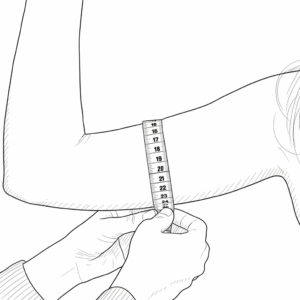
Cuff Selection: Once the arm circumference is obtained, select a blood pressure cuff where the patient’s arm circumference falls within the middle range of the cuff’s indicated circumference.
Avoid selecting a cuff where the measurement is at either the very minimum or maximum edge of the cuff’s specified range, as this can compromise measurement accuracy. Optimal fit ensures the inflatable bladder properly encircles the brachial artery.
Extra Small (XS) = 15-28cm
Wide Range (WR) = 22-42cm
Extra Large (XL) = 32-52cm
Alternative Method: BMI Estimation
In situations where direct arm circumference measurement is not an option, Body Mass Index (BMI) can serve as a reasonable estimation tool for initial cuff selection.
Application: Utilize the patient’s BMI to make an educated guess regarding the appropriate cuff size. To assist with this, refer to the BMI chart below, which also provides suggested cuff categories based on your custom ranges.
Important Consideration Regarding BMI Accuracy: It is crucial to acknowledge that BMI is calculated solely based on height and weight and does not account for body composition (i.e., the proportions of bone, muscle, and fat). These tissue types have significantly different densities. Consequently, individuals with the same BMI may have vastly different arm circumferences due to variations in muscle mass or bone structure, potentially leading to an inaccurate cuff fit and compromised blood pressure readings. Wherever possible, direct arm circumference measurement should be prioritized.
Body Mass Index (BMI) and Suggested Cuff Categories
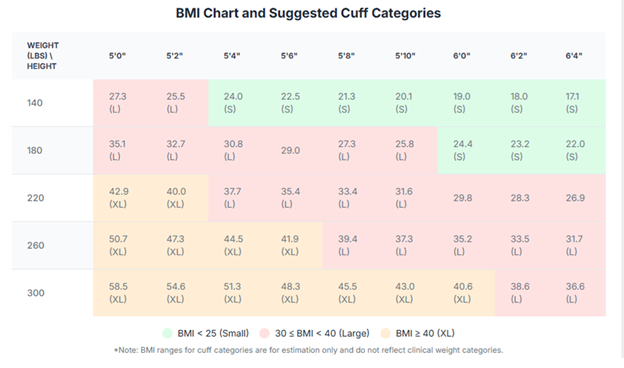
Use this chart to find the approximate BMI based on height and weight. The colored cells and corresponding labels indicate a suggested cuff category based on the following BMI ranges:
- Small: BMI < 25
- Large: 30 BMI < 40
- XL: BMI ≥ 40
- (S) indicates a BMI < 25, suggesting a ‘Small’ cuff category.
- (L) indicates a BMI ≥ 30 and < 40, suggesting a ‘Large’ cuff category.
- (XL) indicates a BMI ≥ 40, suggesting an ‘XL’ cuff category.
Note: The ranges provided for Small, Large, and XL are custom to your request and do not align with standard clinical BMI categories (Underweight, Normal, Overweight, Obese Class I/II/III). This chart is intended solely as an estimation tool for cuff sizing based on these custom categories.
Error Codes
No Display
Screen will not turn on after clicking the Start/Stop button. Batteries are drained or inserted incorrectly.
Replace batteries with new ones. Check the battery installation for proper placement of the battery polarities.

A DC power supply is currently plugged into the device and the voltage is too high or too low.
Do not plug in any power adapter. Only use specified batteries.

The battery level is too low.
Replace with new batteries.

The cuff is wrapped too tight or too loose.
Please wrap and fasten the cuff so that it is not able to slide on/off. You should also be able to fit only one finger in between the cuff and your arm.

The air connector plug is not fully inserted.
Firmly press the air connector plug in the slot all the way. The air connector port is located on the left side of the device. Then take your measurement again. If issue persists, please contact Tenovi Support for assistance.

Excessive body motion is detected. This can mean the arm with the cuff is shaking or moving too much for the device to take an accurate measurement. If this occurs a second time, the device may display "E01".
Please relax, stay still and be quiet while taking another measurement. If the issue persists, please contact Tenovi Support for assistance.

Pulse is not detected during measurement.
Please make sure the cuff is wrapped tight enough so you are unable to slide it up or down on your arm. Ensure that the cuff is wrapped on your bare skin, with no clothing in between the cuff and your arm. Take another measurement. If the issue persists twice, "E01" will be displayed. Please reach out to your doctor first, then contact Tenovi Support.

The measurement that was detected is out of the measurable range for this device.
Take a couple of deep breathes to relax your body and then measure again. If the issue persists twice, "E01" will be displayed. Please reach out to your doctor first, then contact Tenovi Support.

Data transmission error or server connection error has occurred.
Move to another area, preferably closer to a window, then try again. Use the device at a location where you get strong cellular signal with your mobile phone. If the issue persists, contact Tenovi Support for assistance.

No cellular coverage or there was a cellular connection error.
Move to another area, preferably closer to a window, try again. Use the device at a location where you get strong cellular signal with your mobile phone. If the issue persists, please contact Tenovi Support for assistance.

The device has a SIM card error or does not detect a SIM card.
Please call Tenovi Support for assistance.

A hardware error was detected.
Retake measurement. If the issue persists, please contact Tenovi Support for a replacement device.
Device Appears Frozen/Unresponsive
If the device screen looks frozen, unresponsive, or stays on for more than 5 minutes take the batteries out and put them back in.
There is not a way to reset or recalibrate the BPM. Taking the batteries out will ensure the device is off. This will not erase saved measurements.
BPM May Display “HI” or “LO”
This is not an error but means measurement is too low or too high for the device to measure. The Tenovi BPM can only measure accurately in the following ranges:
- Systolic: 60mmHg to 230mmHg
- Diastolic: 40mmHg to 130mmHg
- Pulse: 40-199 beats/minute
For more information on the variability of blood pressure measurements, see our dedicated reference for BPM Variability.
BPM not transmitting, no error code displayed
- Power cycle your BPM by removing and reinserting the batteries. Ensure the device is able to power on.
- Retake your measurement while keeping the BPM close to a window.
- If your BPM still is not transmitting after a successful measurement, please contact Tenovi Support.
Device Specifics
Device Features
Triple Mode: Takes 3 back to back measurements and will display your current average blood pressure.
Start/Stop: Begin or end a single BP measurement.
Irregular Heartbeat Event
The Tenovi Cellular BPM can also identify an Irregular Heartbeat (IHB). An IHB is flagged when the device detects a significant variation in the heart’s rhythm (the time between successive beats) during a measurement. Specifically, if two or more pulse intervals were recorded, and the difference between each interval and the average is larger than ±25% of the average; or if four or more pulse intervals were recorded, and the difference between each interval and the average is larger than ±15% of the average value, the irregular pulse symbol will be displayed along with measurement results.

Important Icon Indicators
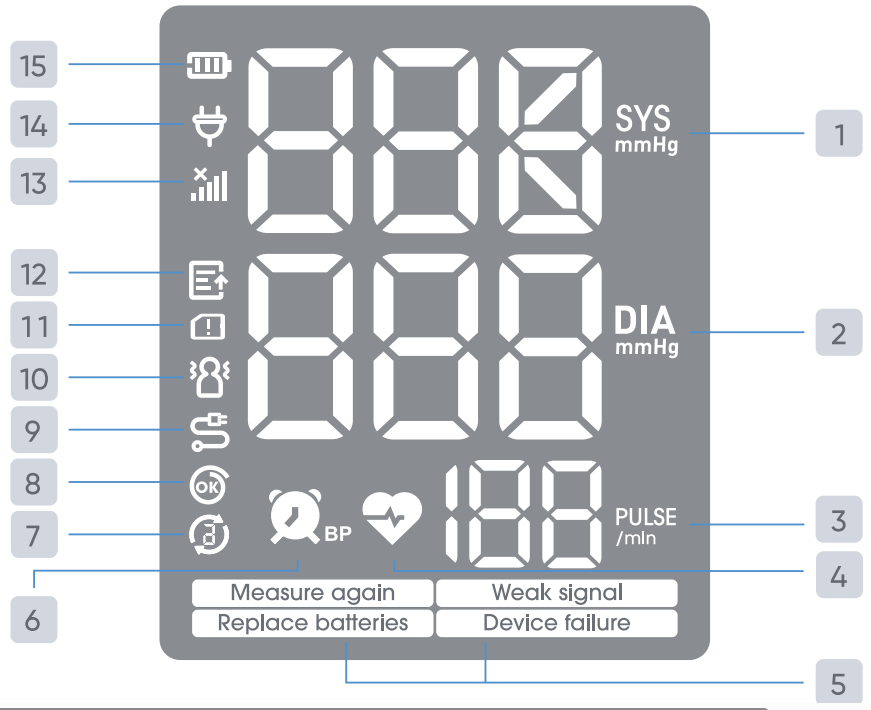
1. Systolic blood pressure reading
2. Diastolic blood pressure reading
3. Pulse display
4. Irregular pulse rate symbol
5. Error messages (refer to Error Codes section).
6. Measurement reminder icon
7. Triple Measurement icon. The number inside the arrows indicates which measurement is currently in progress.
8. Cuff wearing detection icon. If the word “OK” does NOT appear inside the symbol, that means there is a cuff error (refer to Error Codes section).
9. Cuff abnormal icon. This means the air connector is not inserted properly into the device (refer to Error Codes section).
10. Excessive body motion detector icon. This appears when too much movement was detected during a measurement causing the device to turn off (refer to Error Codes section).
11. SIM card error icon (refer to Error Codes section).
12. Data pending to transmit icon. This means there are measurements saved on the device that have not been transmitted (refer to Error Codes section).
13. Signal indication icon. This means there is no nearby cellular coverage or there is a cellular connection error (refer to Error Codes section).
14. Adapter Insert Indicator. This means there is power being supplied from an adapter. Please unplug right away as we only authorize use of AA batteries to power your Cellular BPM.
15. Battery Indicator. Shows current battery level.
Transmitting Your Measurements
The Tenovi Cellular BPM will connect automatically out of the box to the nearest cellular network after a successful measurement is completed and transmit your measurements.
Storage Events
The Tenovi Cellular BPM will store historical measurements on the device. This means if your device is unable to find a cellular signal, the BPM will save your measurements. After each measurement the device will attempt to connect to a nearby cellular network and when successful, will transmit all saved measurements. You are not able to cycle through previous measurements on the device itself.
Maintenance
In order to get the best performance, please follow the instructions below.
Cleaning Process:
- Step 1: Before cleaning the monitor, make sure that the monitor is
switched off and disconnected from the power line. - Step 2: Clean the cuff with a soft cloth dampened with the soapy water.
Until no visible contaminants remain. - Step 3: Rinse the cuff and wipe off the cleaning solution with a fresh cloth
or towel, dampened with tap water after cleaning until no visible
cleaning agent remains. - Step 4: Wipe off with a dry cloth to remove residual moisture.
- Step 5: Air dry the cuff thoroughly after cleaning.
Disinfection Process (Clean the monitor before disinfection):
- Step 1: Before disinfecting the monitor, make sure that the monitor is
switched off and disconnected from the power line. - Step 2: Disinfect the cuff with a soft cloth dampened with the 70%
isopropanol during 10 minutes. - Step 3: Rinse the cuff and wipe off the disinfection solution with a fresh
cloth or towel, dampened with tap water after disinfecting until no
visible disinfection agent remains. - Step 4: Wipe off with a dry cloth to remove residual moisture.
- Step 5: Air dry the cuff thoroughly after disinfecting.
Device Reissue
If this is a replacement device please visit the Tenovi Web App for further assistance.
Downloads
Sources
- Schutte, A.E., Cuschieri, S., Mels, C.M.C., & Kruger, R. (2022). Blood pressure and its variability: Classic and novel measurement techniques.
Journal of Human Hypertension. - Musini, V.M., Gueyffier, F., Puil, L., Salzwedel, D.M., & Wright, J.M. (2009). Factors affecting blood pressure variability: Lessons learned from two systematic reviews of randomized controlled trials.
Current Hypertension Reports. - Centers for Disease Control and Prevention. (2023). Measuring your blood pressure.
CDC High Blood Pressure. - American Heart Association. (2023). Monitoring your blood pressure at home.
American Heart Association. - Kallioinen, N., Hill, A., Horswill, M.S., Ward, H.E., & Watson, M.O. (2017). Sources of inaccuracy in the measurement of adult patients’ resting blood pressure in clinical settings: A systematic review.
Journal of Hypertension.