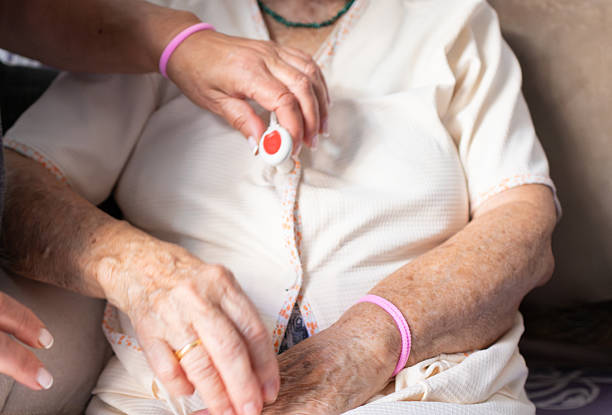
Medical alert devices connect a person to emergency help at the press of a button or, in many models, automatically. They also serve as a sense of reassurance for caregivers. The U.S. Centers for Medicare & Medicaid Services (CMS) classifies these tools as personal emergency response systems (PERS). They give older adults, people with chronic conditions, and those who live alone a fast way to summon help when a fall, cardiac event, or other emergency happens.
The category has grown well beyond the simple pendant of a decade ago. Today’s medical alert devices add fall detection, GPS location, two-way voice, and cellular connectivity. Tenovi is a member of the Connected Health & Safety Association (CHS), the leading voice for the connected health and safety industry, whose members represent roughly 80% of the U.S. connected health and safety market. That community sits at the intersection of emergency response and remote patient monitoring (RPM), and it shapes where these devices are heading.
This guide breaks down how the devices work, the main types available, the features that matter most, and several of the brands care teams and families ask about.
How Medical Alert Devices Work
Every medical alert system relies on three parts working together. Understanding each helps buyers and care teams compare models on more than price.
The first part is a wearable transmitter, usually a pendant, wristband, or clip. It holds the help button and, in newer devices, the motion sensors used for fall detection. The second part is a base console or cellular module that relays the alert. In-home systems connect through a landline or cellular network. Mobile systems carry the connection with the user. The third part is a 24/7 monitoring center. Trained operators receive the alert, speak with the person through two-way voice, assess the situation, and dispatch emergency services or a designated contact.
Fall detection deserves a closer look, because it is the feature most often misunderstood. These devices use accelerometers to measure sudden changes in speed, sometimes paired with barometers or altimeters that sense a change in height. On-device algorithms then try to separate a genuine fall from ordinary motion like sitting down quickly. When the system reads a fall, it signals the monitoring center even if the wearer cannot press the button.
Automatic detection matters because people do not always call for help. Research published through the U.S. Patent and Trademark Office notes that among the oldest adults, a large majority who had access to a PERS did not use it to call for help after a fall when they were alone and could not get up. A device that acts on its own closes that gap.
The Main Types of Medical Alert Devices
Medical alert devices fall into a handful of categories. The right choice depends on where a person spends time, how active they are, and whether they live alone.
In-Home Landline Systems
These use a base unit connected to a home phone line, paired with a wearable button. They work within a set range of the base, usually across a house and yard. They suit people who spend most of the day at home and already have a landline.
In-Home Cellular Systems
These work like landline systems but relay alerts over a cellular network instead of a phone line. They remove the need for a landline, which many households no longer keep. Coverage still centers on the home and its immediate surroundings.
Mobile GPS Systems
Mobile systems add GPS location and cellular connectivity so a person can get help anywhere with signal. These are a strong fit for active older adults who drive, walk, garden, or travel. Many include fall detection and two-way voice built into the pendant itself.
Wearable Smartwatch-Style Devices
Some newer devices combine a help button, fall detection, and step or heart-rate tracking in a watch form factor. They appeal to users who want something that looks like consumer technology rather than a medical device, which can improve daily wear.
Fall Detection Add-Ons
Most brands offer fall detection as an option layered onto an in-home or mobile plan, often for an added monthly fee. Buyers should confirm whether it is included or extra, since medical alert companies package it differently.
Key Features to Compare
Not every medical alert device needs every feature. Matching features to the person’s daily life prevents overpaying and, more important, prevents gaps in protection.
The features that most affect real-world safety are automatic fall detection, battery life, water resistance for shower use, range from the base for in-home models, GPS accuracy for mobile models, and the response time and training of the monitoring center. Two-way voice quality also matters, since the operator interaction is the moment the system earns its keep.
For people managing chronic conditions, connectivity is worth weighing carefully. A device that pairs safety monitoring with health data can support a broader care plan. This is where the line between emergency response and remote patient monitoring begins to blur.
Leading Medical Alert Brands
Several established brands come up repeatedly when families and care teams evaluate options. The short profiles below describe general positioning, not an endorsement, and pricing and features change often, so confirm current details directly with each provider.
Medical Guardian offers a broad lineup spanning in-home landline and cellular units plus mobile and smartwatch-style devices, with fall detection available across much of the range. It is a member of the Connected Health & Safety Association.
MobileHelp focuses on cellular in-home and mobile systems, often bundling a home base with a mobile unit so one plan covers the house and the go.
LifeFone is known for flexible at-home and on-the-go plans, including options that combine an in-home base with a mobile device and add-on fall detection.
Bay Alarm Medical and Lifeline round out the group families often shortlist, each offering in-home and mobile tiers with monitoring center support.
When comparing brands, look past the headline monthly price to what is included. Fall detection, spouse coverage, equipment fees, and monitoring quality vary enough to change the real cost and the real protection.
Where Medical Alert Meets Remote Patient Monitoring
Medical alert devices answer a single urgent question: can this person get help right now? Remote patient monitoring answers a longer one: how is this person’s health trending over days and weeks? The two are converging, and organizations across the connected health and safety space are building toward that overlap.
Tenovi provides the cellular-connected infrastructure that care organizations use to collect patient vitals like blood pressure, weight, and glucose through the Tenovi Gateway, then route that data into their own platforms. Where a medical alert device flags an acute event, an RPM program can catch the slow drift that precedes one, such as rising blood pressure or weight gain that signals fluid retention. Together, reactive safety and proactive monitoring give patients a fuller layer of protection at home. That combined model is central to why the connected health and safety industry treats emergency response and remote patient monitoring as parts of the same mission.
Frequently Asked Questions
1) What is a medical alert device?
A medical alert device is a wearable system that lets a person summon emergency help by pressing a button or, in fall-detection models, automatically. CMS refers to these as personal emergency response systems (PERS). Most connect the user to a 24/7 monitoring center that can dispatch help.
2) Does Medicare cover medical alert devices?
Original Medicare generally does not cover medical alert systems, since it does not classify them as durable medical equipment. Some Medicare Advantage plans offer them as a supplemental benefit. Coverage varies by plan, so confirm the details with the specific insurer before purchasing.
3) How does fall detection actually work?
Fall detection uses accelerometers, and sometimes barometers, to sense a sudden change in motion or height. On-device software then decides whether the movement was a real fall. When it reads a fall, the device alerts the monitoring center even if the wearer cannot press the button.
4) What is the difference between in-home and mobile systems?
In-home systems work within range of a base unit and suit people who spend most of their time at home. Mobile systems use GPS and cellular networks so a person can get help anywhere with signal. Many active users choose mobile devices for coverage away from the house.
5) Are medical alert devices the same as remote patient monitoring?
No. Medical alert devices respond to acute emergencies in real time, while remote patient monitoring tracks health data like blood pressure or weight over time. The two serve different purposes but increasingly work together to protect patients at home.
6) What should I look for when choosing a device?
Prioritize automatic fall detection, battery life, water resistance, range or GPS accuracy, and the quality of the monitoring center. Compare what each plan includes rather than the headline price, since add-ons like fall detection and spouse coverage change the true cost.
Understanding Medical Alert Devices
Medical alert devices give older adults and people with chronic conditions a dependable way to reach help fast, whether through a pressed button or automatic fall detection. The main types span in-home landline and cellular units, mobile GPS systems, and smartwatch-style wearables, each suited to a different lifestyle. The features that matter most are fall detection, connectivity, battery life, and the quality of the monitoring center behind the device. As the connected health and safety industry matures, these safety tools are increasingly paired with remote patient monitoring to protect patients both in the moment and over time.